For solo Part 107 pilots

Run your whole drone business from one login.

The quote, the airspace check, the maps, the client delivery and the invoice for every job sit on one record, so nothing gets typed twice and you always know who has paid. Built by a working Part 107 pilot for pilots who do every job themselves.

Free never runs out. No card required. Want a walk-through first? Book a demo.

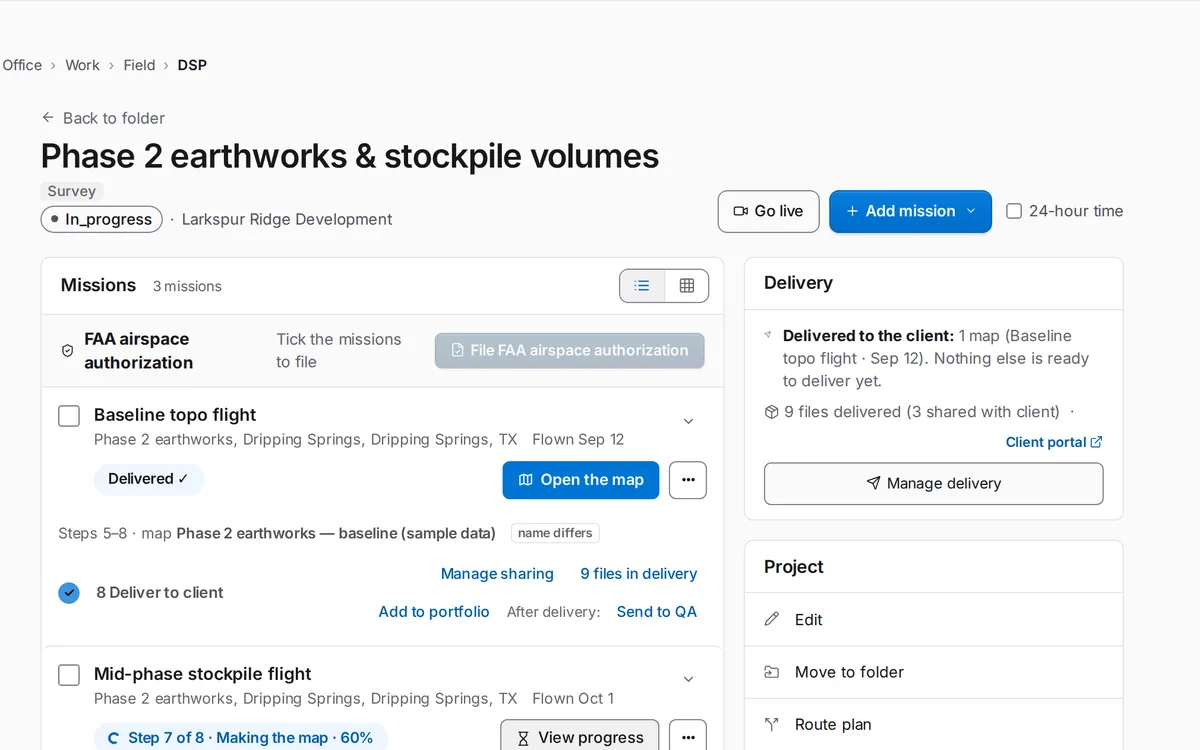
A SkySuite project page with its missions, the step each one is on (the first delivered to the client, the next making its map) and the project's delivery.
One job in SkySuite, from the first mission to the client delivery.

The solo pilot's week

Sound familiar?

The flying is the easy part. These are the jobs that eat the rest of your week, and what SkySuite does about each one.

  1. 01Five apps, five logins, nothing connected
  2. 02Leads go cold while you're in the air
  3. 03Quoting a job eats your evening
  4. 04Chasing invoices instead of flying
  5. 05"Can I even fly there?"
  6. 06Flight logs and maintenance in a shoebox
  7. 07"Where are my maps?"
  8. 08Big files, broken transfers

What you stop juggling

  • A CRM for leads
  • A quoting spreadsheet
  • An invoicing app
  • An airspace app
  • A flight-log app
  • A file-transfer service
  • A map-processing tool

One SkySuite login instead.

The problem Five apps, five logins, nothing connected

The lead is in your inbox, the quote is in a spreadsheet, the flight log is in another app and the invoice is somewhere else. You type the client's details again at every step.

With SkySuite

Every job lives on one record

Office › Work › Home shows your active projects, maps that are processing, what needs your attention and today's field schedule. Open a project and its client, missions, maps, files and invoices are all there.

  • Client, missions, maps and invoices on one project
  • Today's field schedule on Home
  • One login in the office and in the field
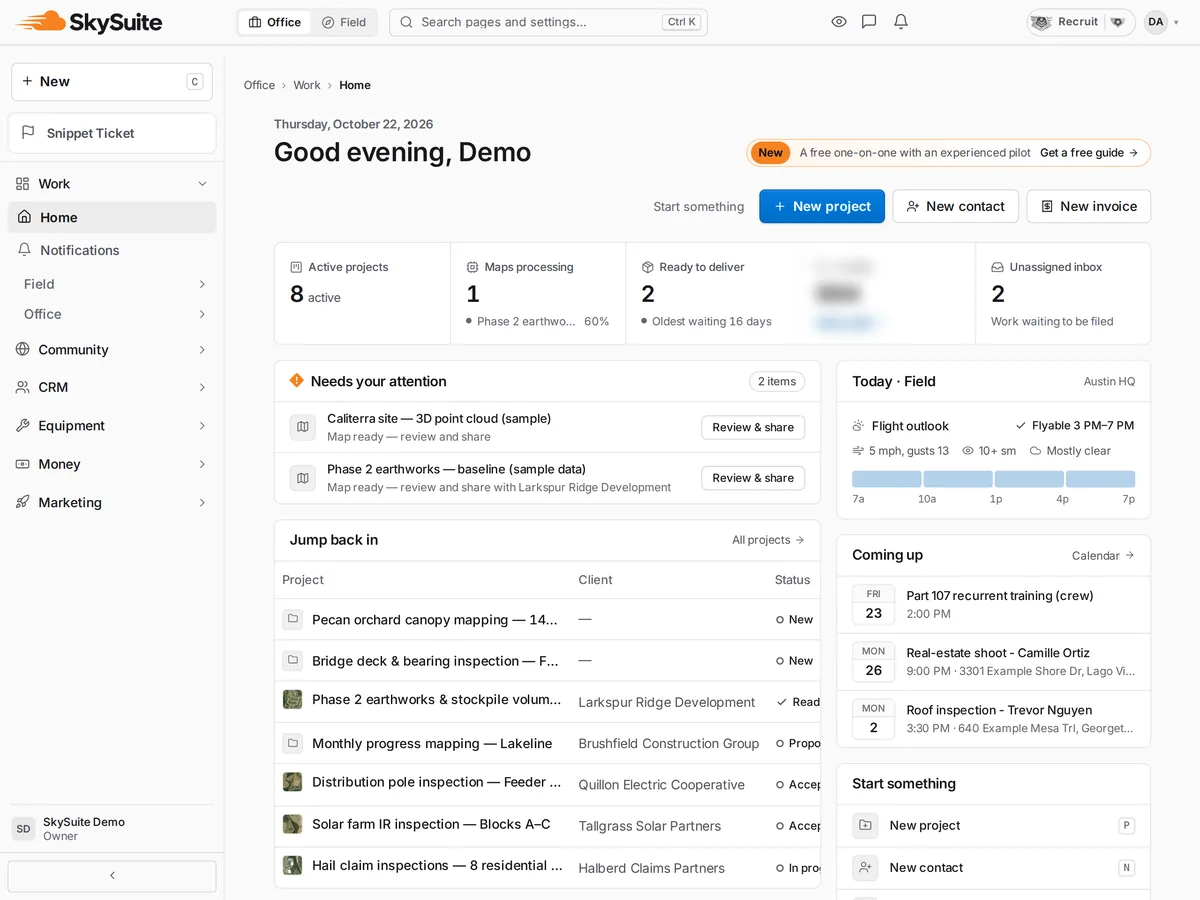
Office Home: active projects, maps processing, what needs your attention and today's field schedule.

The problem Leads go cold while you're in the air

Someone fills in the form on your website at 10 a.m. You're flying until 3. By the time you call back, they've booked another pilot.

With SkySuite

Every new lead gets an answer, even mid-flight

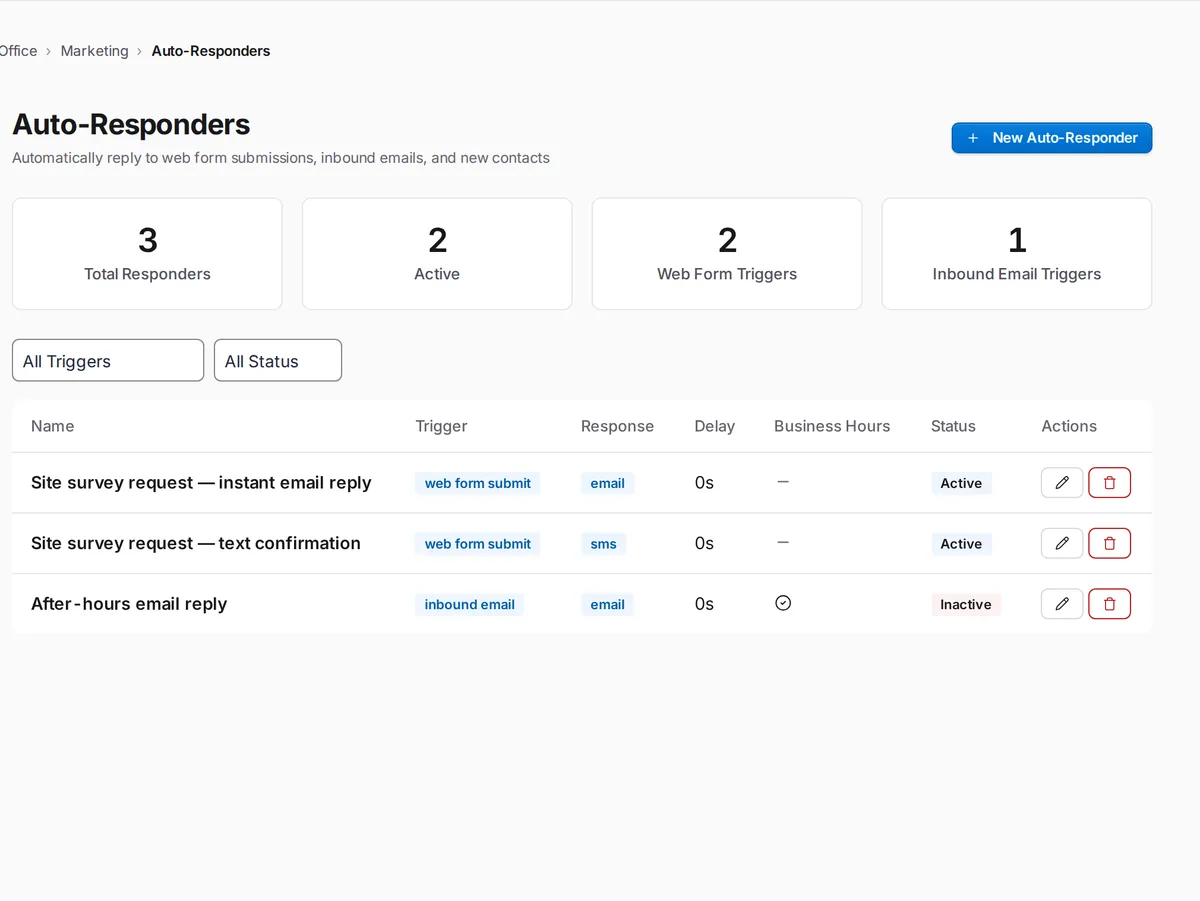
Build a web form in Office › Marketing › Web Forms and put it on your site. An auto-responder replies by email or text on the rules, delay and business hours you set, and the lead lands in your client list. When you can't take a call, the AI Receptionist can answer it and log what the caller needs.

  • Web forms with automatic replies
  • Reply rules, delays and business hours you control
  • Every lead saved to your client list
SkySuite auto-responders: web-form and inbound-email triggers with an email or SMS reply, delay, business-hours setting and active or inactive status.

The problem Quoting a job eats your evening

You work out the acreage, flight time, processing and travel by hand, type it into a document, email a PDF and wait to hear back.

With SkySuite

Price it, send it and get a yes online

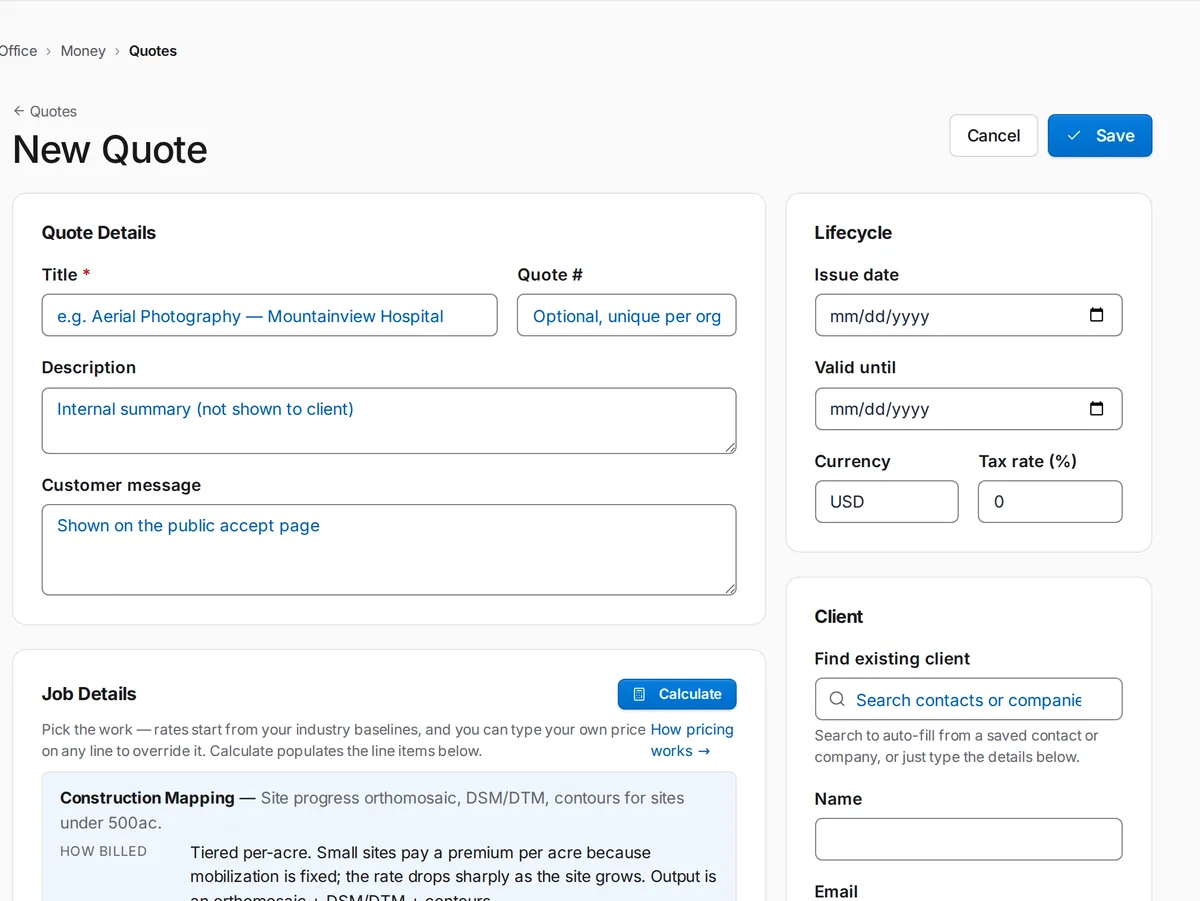
Build the quote in Office › Money › Quotes. Calculate fills in the line items from your industry's baseline rates, and you can change any price. The client gets an email link to read and accept the quote, and Generate Contract turns an accepted quote into a contract.

  • Line items from industry baseline rates you can edit
  • Clients read and accept the quote online
  • An accepted quote becomes a contract in one click
SkySuite New Quote: title, description and customer message, issue and valid-until dates, tax rate, client lookup, and Job Details with a Calculate button that starts from industry pricing baselines.

The problem Chasing invoices instead of flying

The job was delivered two weeks ago and the invoice still says "sent". You can't tell who has paid without opening your bank app.

With SkySuite

Invoices that clients can pay online

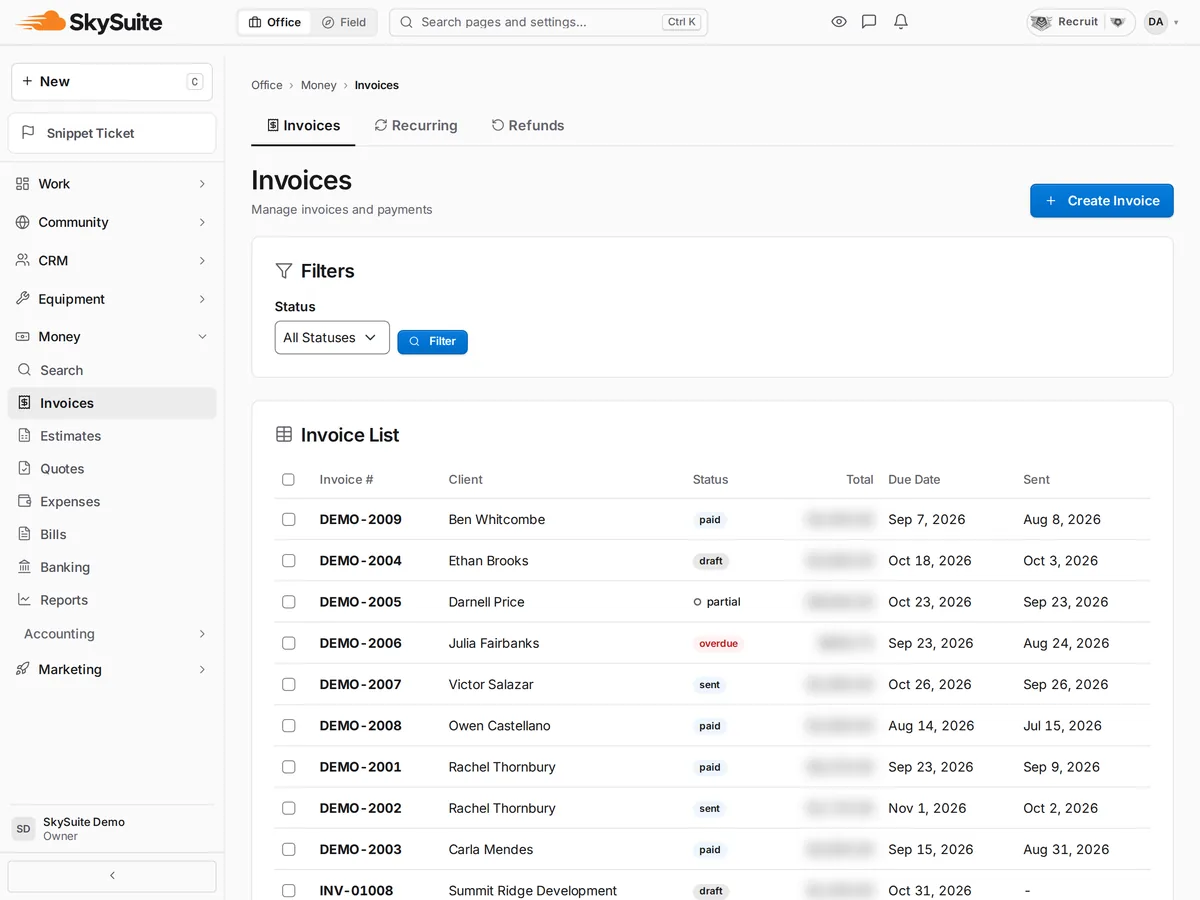
Create the invoice from the job in Office › Money › Invoices. Connect your own Stripe or PayPal account and clients pay online from the invoice. Overdue invoices flag themselves, and part payments are recorded against the balance.

  • Online payment through your own Stripe or PayPal
  • Overdue invoices flagged for you
  • Full and part payments recorded on the invoice
Invoice list with each invoice's client, status, total and due date, all sample clients.

The problem "Can I even fly there?"

Before every job you check the airspace in one app, the weather in another and TFRs in a third, then hope nothing changes by morning.

With SkySuite

Airspace, weather and a go/no-go in one place

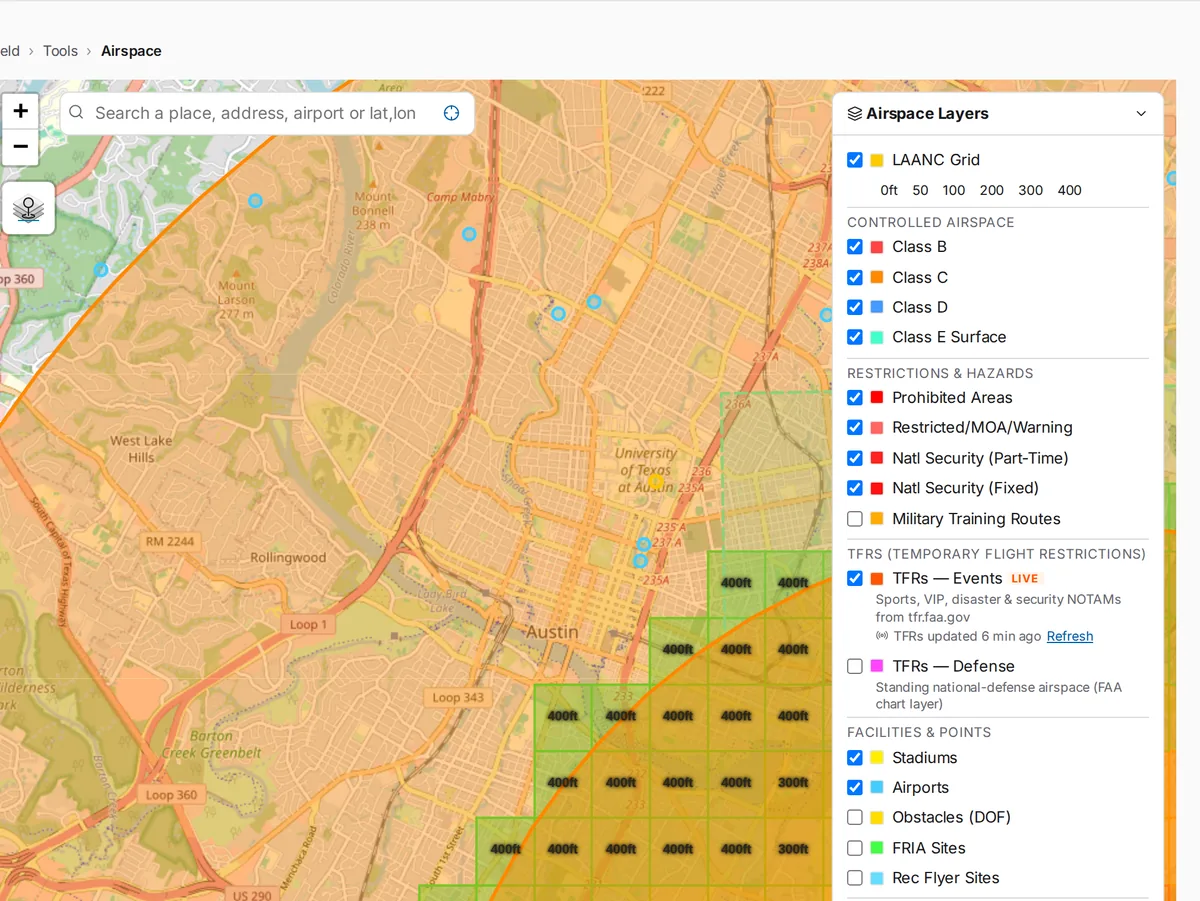
Field › Tools › Airspace shows the airspace class, LAANC grid ceilings, restricted areas and TFRs at your site. Field › Today › Flight Brief puts the forecast and a go/no-go next to your scheduled missions. When you need LAANC, SkySuite opens an FAA-approved LAANC provider's site; you file the request there.

  • LAANC grid ceilings, airspace classes and TFRs on one map
  • Forecast and go/no-go in today's Flight Brief
  • LAANC requests through an FAA-approved provider
Airspace map with the LAANC grid, controlled airspace classes, restricted areas and live TFR layers.

The problem Flight logs and maintenance in a shoebox

A client or your insurer asks for your flight hours and the last time the aircraft was serviced, and you're digging through controller exports and notes.

With SkySuite

Your logbook builds itself from your flights

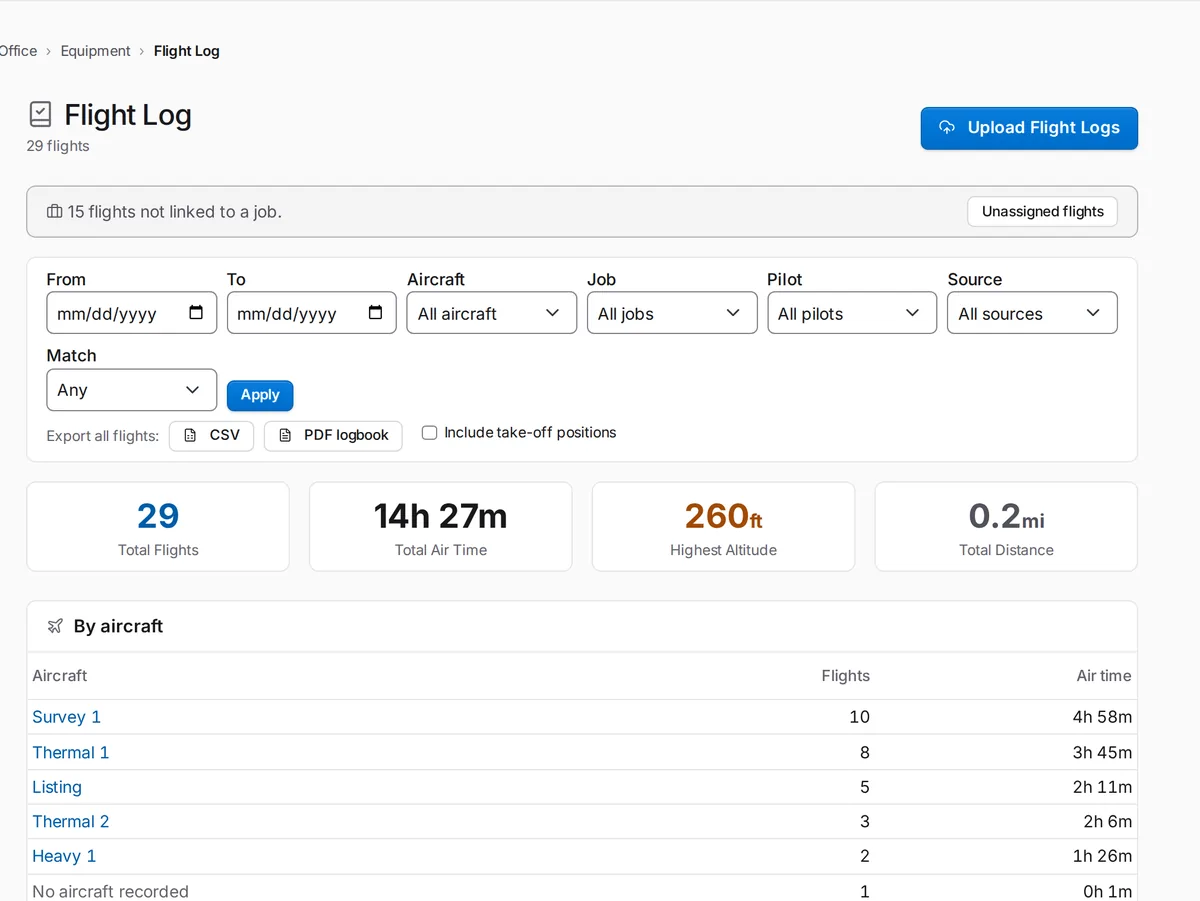
Upload your DJI flight logs in Office › Equipment › Flight Log. Flights, air time and battery cycles fill in by aircraft, and you can export a CSV or PDF logbook. Run pre-flight checklists from the library and record every service in Maintenance.

  • DJI flight-log upload, totals by aircraft
  • CSV and PDF logbook export
  • Pre-flight checklists and maintenance records
SkySuite Flight Log: 29 flights, total air time, highest altitude and distance, filters by aircraft, job, pilot and source, CSV and PDF logbook export, and air time by aircraft.

The problem "Where are my maps?"

The client texts twice a day asking about the deliverables while you're still processing photos and uploading files to three different places.

With SkySuite

Process the maps and hand over one link

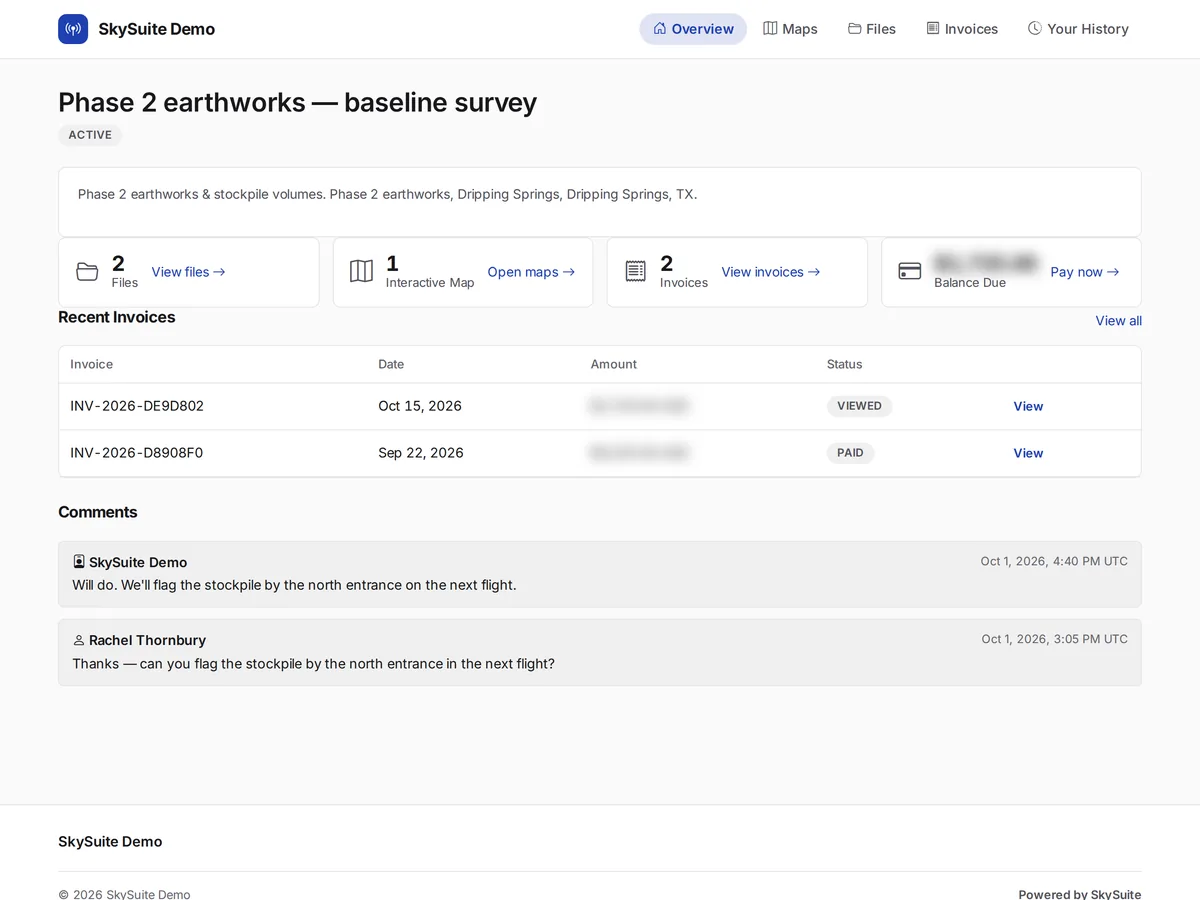
Upload the photos to the mission and SkyPLX-9, our mapping engine, makes the orthomosaic, elevation model, point cloud and 3D model. You see the cost in credits before you start. Then the client gets one portal link with the map, files, invoices and comments.

  • Orthomosaic, elevation model, point cloud and 3D from SkyPLX-9
  • Processing cost shown before you start
  • One client portal for maps, files and invoices
The client portal for one project, with files, the interactive map, invoices and comments in one place.

The problem Big files, broken transfers

A full photo set and a GeoTIFF won't fit in an email, and transfer links expire before the client gets round to downloading them.

With SkySuite

Deliver gigabytes without the back-and-forth

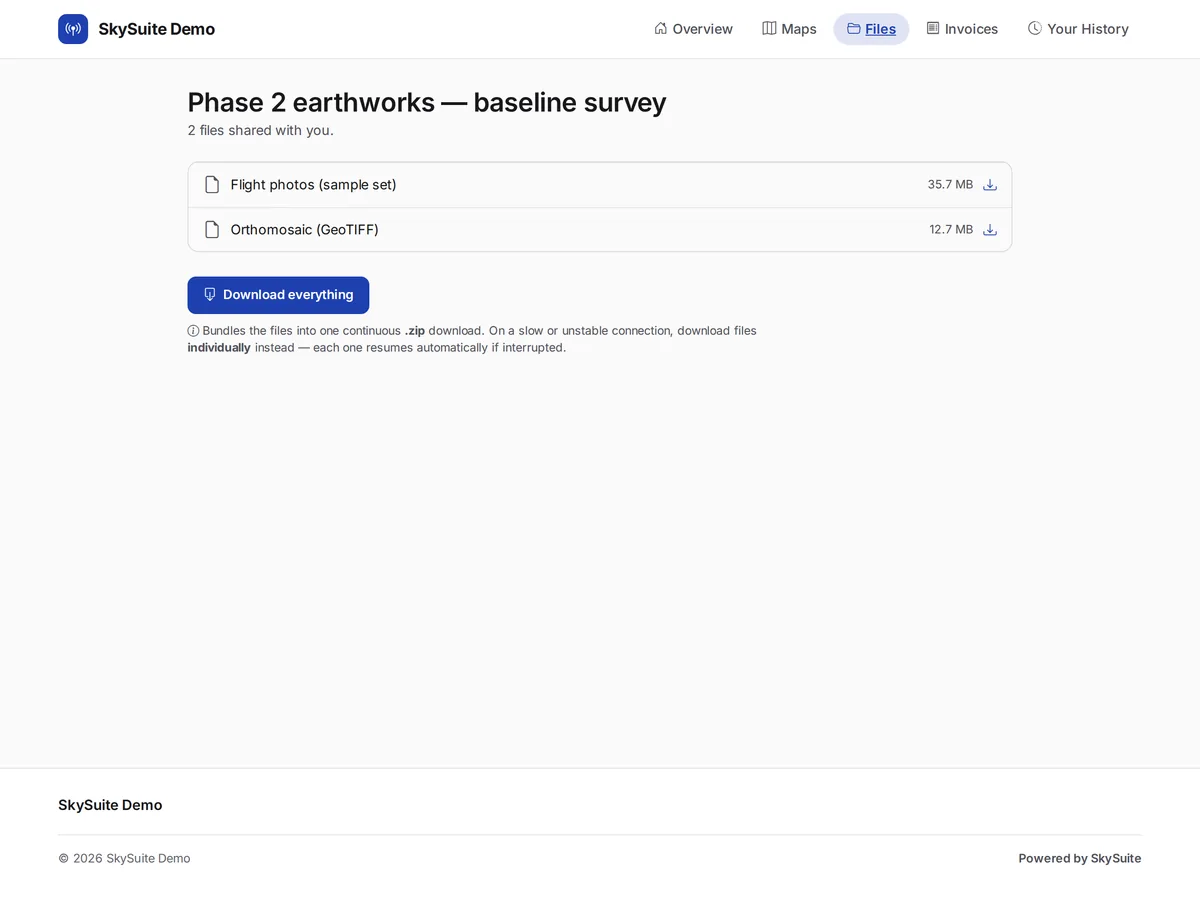
Drag whole folders into the project's delivery in Office › Work › Field › DSP; an upload picks up where it left off if your connection drops. The client's link is private, needs no login and doesn't expire, and every file has its own resumable download plus Download everything. Storage comes with your plan.

  • Folder uploads that resume
  • Private client link with no login and no expiry
  • Resumable downloads for every file
A client delivery page: upload supporting documents, the shared flight photos, orthomosaic GeoTIFF and survey report, and Download everything.

Pricing

Start on Free. No card.

Start on Free, no card required, and try Pro from inside the app: 14 days with no card, or 30 with a card. Your account stays open either way. You pay only for the credits you actually use — AI features and map processing, one wallet — and for Pro when you're ready to run the whole business from one login.

Free

$0

No card required, and your account never gets locked. Get set up, win work, and get paid.

  • One login — built for the solo pilot
  • Up to 2 active projects
  • Up to 2 stored missions (including flown and stowed)
  • Up to 25 contacts
  • 25 starter credits, one time — then buy credits as you need them
  • See, share and download your maps — map processing comes with Pro
  • Original photos are kept for 30 days after processing
  • Invoicing + client portal with SkySuite branding
  • Field crews — free on every plan
  • 2 GB storage included
Create your account

Pro

Most popular

$49 per month

For the full-time solo pro. You're the whole company, so this runs the whole company — win, fly, deliver, invoice, get paid, all under one login. One delivered map usually covers the year.

  • Everything in Free
  • 1 seat included — add teammates at $25/seat/mo or $250/seat/yr
  • Unlimited projects & contacts
  • 250 credits/mo included — AI features and map processing, one wallet
  • 50 GB storage included
Get started

Business

$149 per month

For operations that run SkySuite hard, all day. Everything in Pro, 1,000 monthly credits in place of Pro's 250, and 10 team seats.

  • Everything in Pro
  • 1,000 credits/mo included — replaces Pro's 250, allowances don't stack
  • 10 team seats included — org logins with roles
  • More seats: $25/seat/mo or $250/seat/yr — add anytime, self-serve
  • 250 GB storage included
Get started

Veterans & first responders get 25% off Pro or Business, after verification. Credits stay at standard rates · verify once, keep the rate.

Verify your service →

One pilot. One login. The whole business.

Free never runs out. No card required. Try Pro free for 14 days, or 30 days with a card. Run your next job end to end in SkySuite. Prefer a walk-through first? Book a demo and we'll show you your kind of job.

Comparing plans? See plans & credits.